
Develop a program to send an email
Sure! Here's an example Python program that sends an email using the Simple Mail Transfer Protocol (SMTP) library:
pythonimport smtplib
# Email details
sender_email = "youremail@gmail.com"
receiver_email = "recipientemail@gmail.com"
password = "yourpassword"
message = "Hello, World!"
# Establishing a secure SMTP connection to Gmail's SMTP server
server = smtplib.SMTP_SSL("smtp.gmail.com", 465)
server.login(sender_email, password)
# Sending the email
server.sendmail(sender_email, receiver_email, message)
# Closing the SMTP connection
server.quit()
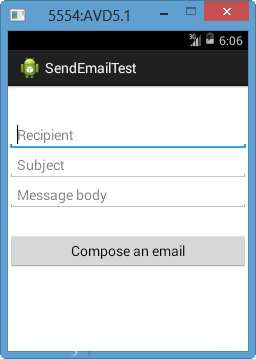
package com.example.tutorialspoint;

import android.net.Uri;
import android.os.Bundle;
import android.app.Activity;
import android.content.Intent;
import android.util.Log;
import android.view.Menu;
import android.view.View;
import android.widget.Button;
import android.widget.Toast;

public class MainActivity extends Activity {
   @Override
   protected void onCreate(Bundle savedInstanceState) {
      super.onCreate(savedInstanceState);
      setContentView(R.layout.activity_main);
Button startBtn = (Button) findViewById(R.id.sendEmail); startBtn.setOnClickListener(new View.OnClickListener() { public void onClick(View view) { sendEmail(); } }); } protected void sendEmail() { Log.i("Send email", ""); String[] TO = {""}; String[] CC = {""}; Intent emailIntent = new Intent(Intent.ACTION_SEND); emailIntent.setData(Uri.parse("mailto:")); emailIntent.setType("text/plain"); emailIntent.putExtra(Intent.EXTRA_EMAIL, TO); emailIntent.putExtra(Intent.EXTRA_CC, CC); emailIntent.putExtra(Intent.EXTRA_SUBJECT, "Your subject"); emailIntent.putExtra(Intent.EXTRA_TEXT, "Email message goes here"); try {startActivity(Intent.createChooser(emailIntent, "Send mail...")); finish(); Log.i("Finished sending email...", ""); } catch (android.content.ActivityNotFoundException ex) { Toast.makeText(MainActivity.this, "There is no email client installed.", Toast.LENGTH_SHORT).show(); } } }Following will be the
In this program, we first import the smtplib library, which provides a way to connect to an SMTP server and send emails.
Next, we define the email details, including the sender and receiver email addresses, password, and message.
We then establish a secure SMTP connection to Gmail's SMTP server using the smtplib.SMTP_SSL() method and login to the sender email account using the login() method.
Finally, we send the email using the sendmail() method and close the SMTP connection using the quit() method.
Note that you'll need to enable "Less secure app access" in your Gmail account settings in order to send emails using this method. Alternatively, you can use an API key to authenticate your email account instead.


0 Comments